
 by
by The system collects and aggregates all data provided by the SSP about the campaign and creatives, and calculates the main performance metrics.
By default, the system displays statistics for the key metrics applicable to the user’s creatives over the last week:
- Date
- Clicks
- Impressions
- CTR
- Spend
- CPC – cost per click
- CPM – cost per 1,000 impressions
- CPV – cost per view (for video creatives)
- VTR (for a video creatives)
- Completion Rate
- Reach
- Frequency
When navigating to the Statistics section, the user sees the previously selected parameters. To display the statistics, click the “Update Report” button. The date range for displaying collected statistics is unlimited. Sorting values in each column is available by clicking the column header in the table.
1.1. Additional Metrics for Creatives
Each creative type has metrics that cannot be applied to other types. Depending on the creatives used, additional columns can be added to the main table. For correct analysis of these metrics, it is recommended to complement the column selection with grouping by campaign type.
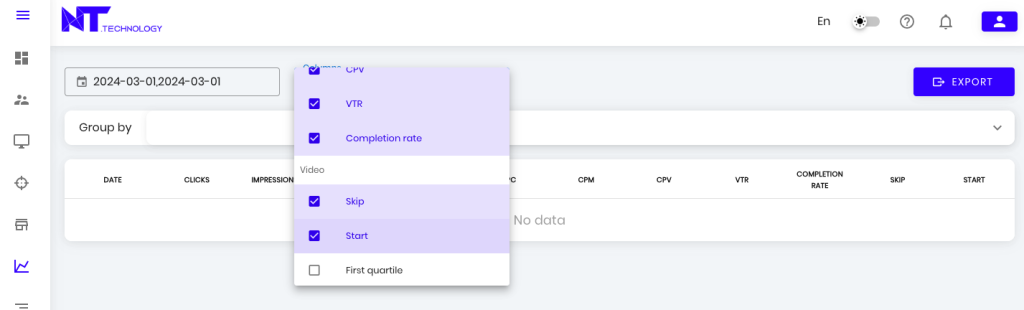
The following metrics are available for Video and Audio creatives:
- Skip
- Start
- First quartile
- Midpoint
- Third quartile
- Completion
- Mute
- Unmute
- Close
- Pause
- Resume
- Player expand
- Player collapse
- Rewind video
- Fullscreen
- Exit fullscreen
For Native creatives, the following columns can be added:
- Visibility 50%
- Visibility 100%
- Video visibility 50%
1.2. Grouping Creative Metrics
The grouping block is designed to distribute calculated metrics across main criteria groups. Grouping allows for detailed analysis of the effectiveness of the applied campaign tools.
After selecting grouping criteria, additional columns appear in the table – one for each criterion. All statistical metrics are recalculated according to the grouping. Each grouping criterion can be filtered. No more than 5 grouping criteria can be selected.
The following criteria are available for grouping:
- Operating System
- Page / Url Store
- City
- SSP
- Client
- Device
- Region
- Browser
- Country
- Language
- Placement
- Campaign Name
- Creative Name
- Campaign Type
- Connection Type
- Ad set
- Creative ID
- Bundle
- Campaign id
- Date
The more grouping criteria are selected, the larger the data set provided by the system. In such cases, for convenience, it is recommended to use the “Export” button to continue the analysis using additional tools.